
Features / Clinical and Whilst In The Chair / Medical history
Clinical and Whilst In The Chair
They fill it in before they sit down.
Patients still get a paper form on a clipboard at reception. The allergy ends up on the back, in pencil, half legible, and you find out in the chair or not at all.
In Joyful, patients answer 26 questions on their phone the evening before their visit. You review the answers as the first step in the chair. Answers last a year, so patients don’t fill in the same form twice for no reason.
Your health · 1 of 26
Do you take any prescribed medicine?
Include tablets, inhalers and anything you take every day.
How it works
01
Appointments start on time
Patients fill in their history at home the evening before.
If anything is missing or more than a year old, the patient gets a personal link the evening before their visit. They open it with their date of birth and have 24 hours to finish. Returning patients only need to confirm what has changed.
- Patients fill in the form at home, so the dentist isn’t waiting on a clipboard.
- Their date of birth opens the link, which is easy for them and a light check for you.
- If nothing has changed, returning patients tap through. If something has, last year’s answers are already filled in.
Medical historyYour health · 1 of 26
Do you take any prescribed medicine?
Include tablets, inhalers and anything you take every day.
YesNo02
Every patient arrives with their history done
Check-in waits until the history is up to date.
Check-in stays on “checking in” until the medical history is up to date, so the patient doesn’t show as waiting for the dentist before the file is ready. If they arrive without doing it, they can scan a QR code or type a short code at the desk and finish it on their own phone.
- Patients only move to waiting once their history is current.
- A QR code at the desk works on their phone or a practice tablet, with no paper needed.
Ground controlGround control
Arrivals
Helen · Hygiene · 09:00
Reception
Checking in · consent waiting
Surgeries
Cathy Ullrich · In surgery
03
Spot what matters in seconds
Clinically relevant answers are highlighted for you.
Joyful highlights the clinically relevant answers, such as a yes to a medical condition or a lifestyle risk, so you don’t reread all 26. You can correct anything with the patient, and your changes are saved under your name. Marking the history as reviewed is part of the lock checklist, so it can’t be skipped.
- Important answers are highlighted for you.
- Every correction shows who made it.
- Every practice uses the same 26 questions, so records stay comparable.
Medical history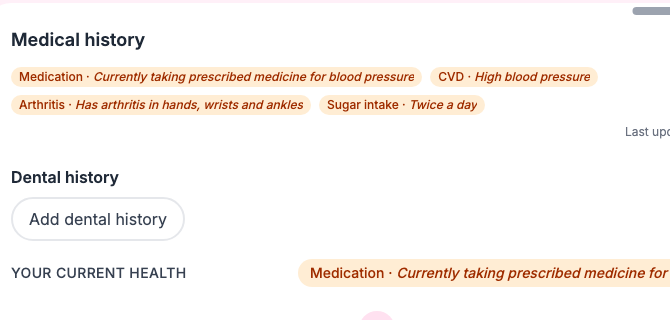
The small print
- The questions are fixed. Practices can’t add, remove or reword them.
- Tapping “all correct” on a quick review doesn’t renew an answer that is more than a year old. It still needs updating.
- The reminder only goes out when the patient has an appointment the next day.
- If a patient says they feel unwell, Joyful asks them to rebook. It doesn’t cancel the visit for them.